The original sketch
I started with a keyboard composition and a Hookpad version of it. I think I like the Hookpad version better. This is the way it came out of my brain, mostly, except I imagined it on piano
Audio/video example 1
How playing changed my songwriting
So let's turn this one into a process rundown where we continue to prove the use case for AI and Udio for musicians and composers.
It's crazy how much learning to play the keyboard changed my songwriting process. The whole thing used to be very analytical for me. Imagine your brain is very good at math, but can't do it on command, or really understand how it's doing the math it's doing. That's the way I work.
And when I write songs, historically anyway, there's a rhythm there, but the process is silent, while I figure out what the words are as my math brain puts it all together. It's cool.
But learning to play the keyboard changed that. Now, I prefer to use my math brain to non-cognitively play the keyboard, like a form of automatism, and come up with a sound first.
From there I listen to it a billion times, and go straight to a kind of word salad that fits the sound. Once I have that, I write out the song, and either forget about the original piece I made it from, or I run it through the ai to make a cool instrumental out of.
That's what I did here.
I think a big question that people are asking is, "okay, but what's the machine going to actually do to my music though?" And that's a good question, because before the 1.5 model, I hadn't tried to do this totally from scratch before, and I wasn't sure what would happen.
Turns out, it's all about noise levels! Let's go over it.
The first Udio pass
Starting with the first piece, I made the dirtiest possible way, and intentionally without my DAW, I took the screen video, and uploaded it into Udio. This gave me 120 seconds of usable audio.
I did mess around with the similarity. That works a little like your denoising feature in Stable Diffusion. And with images, the way it sort of functions is by blurring the image. You'll go from 0 which represents no difference or only a slight difference, all the way up to 10 which is essentially, nothing like the image you started with.
Think of it like a kind of blur that you're applying to the ai. The more clearly it sees things, the less work it's going to take for the machine to put the piece of art back together as described.
In Udio, it works the same way. Essentially. This one was made with a similarity setting of 38%, which is about a 4.5 in denoising terms when you take all the constraints into consideration.
In other words, I'm not asking it to change a lot.
I did it about enough to set the genre and instrumentation, without changing the composition enough to notice a big change.
And generally, since 1.0, I also like to set the sound quality to ultra. I'm actually not sure if I did that here. I'm very stoned. I might have totally forgotten to do.
It's all so fiddly.
That's what I like about it.
Audio/video example 2
Changing the similarity
Aw fuckit, let's keep going. So, at 45%, we can't really shift it too far from the original sound. But, by changing the genre, we can get it to fun and surprising stuff at this setting. This one's incomplete, so it goes silent when it runs out of source material, but it's enough…
Audio/video example 3
Now we set it to 50%. We're asking for improvisational jazz, and this time, it says it fused in some Latin jazz. This is fun, but it's hard to listen to
Audio/video example 4
Let's put it up to 55% and see where on the jazz spectrum we end up. And... yay 90s bar mitzvah music! lol. So now, theoretically, we're klezville. Sort of, just the outskirts. This is positive
Audio/video example 5
There are still so many boops to be made.
So 50% is about as far as you can go without completely losing your original composition. Too much more and it gets lost in strings, and more than that, and it will get to the genre you want to do, but you're going to lose anything that sounds like your boop.
Changing the source audio
But what if you did change your composition? Two problems with this piece. If we're shifting to jazz, we're not hitting jazz chords, which is fixable. But we're also not making any hugely jazz compatible sounds.
Now, imagine this is a sample and we don't have the midi. Well, we would hack the fuck out of it. So this is what we do here.
So what I did here was open up Audacity, and did their "high quality" pitch shift.
It does work for pitching, but it adds noise to your composition. We don't actually want a lot of noise, but a little is enough to mess up the spectral on this just enough... that it gives the machine a little more to work with without increasing the distance from the piece itself.
That's handy!
It also gives us a deeper tone, which'll be easier to match against those jazzy jazzy sounds.
And... old timey big band.
I am so here for this.
This is a good poc.
Audio/video example 6
Building on the unexpected arrangement
This is where we riff. The machine hit me back with a concept I wasn't expecting. So now, we build on that by changing the prompt to "jazz, hip hop, big band, swing"
Now, we reduce the similarity to 36% to maintain the composition, but get some recast action going on. This one's a nice happy piano piece. And I finished this one, because I like the dissonance of it.
Since the similarity is set so low on it, you also get most of the resonant noise behind it. This is directly equivalent to the amount of static you have in an image.
Now, normally, that would be bad. You usually want clear crisp tracks. And that's true, you do.
But, since this is an ai track we're talking about, we need to understand that the noise removal process is everything. And when you start with high noise, you get bleed. And bleed makes all kinds of fun and interesting things happen!
So here's where we are now
Audio/video example 7
So, feeding it back into the machine, we get this iteration which I really like, a lot
Audio/video example 8
Shaping the noise
mwhahahah, let's see what happens!
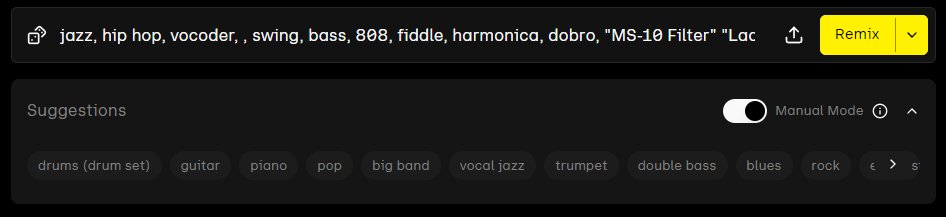
The prompt is: jazz, hip hop, vocoder, , swing, bass, 808, fiddle, harmonica, dobro, "MS-10 Filter" "Ladder Filter" "Steiner-Parker Filter"
The idea here at this step is to form the background radiation into thing we can use at the next step when we turn up the similarity and melt it down a little more
Much better. Now let's have some fun
Audio/video example 9
Taking it into electronic music
This is all fine and good, but I'm bored. So let's try a new prompt "edm, highly sampled, bitonal, edm, idm, experimental"
Better, there are a couple of sections in here that would be fun to expand on. Let's do that
Audio/video example 10
This is going in a really interesting direction. Time to expand on it.
The final piece
And... half an hour of inpainting later....
we have a final product
https://www.udio.com/songs/xdGxXhpTQff91LC6mLRNEi
Anyway, that's essentially it. How to noise paint on Udio.
I don't know if that's where I was planning to go.
I don't remember.
But it's not the outcome that's important.
It's about the process, and how it tickles your brain